

How to Set Up and Use Your Voice Call Watch Efficiently
To properly set up a Voice Call Watch, you need to know how to communicate with it and how it fits into your current processes. You can make calls hands-free from these smart wearables, which have high-definition mics, loud speakers, and Android-based operating systems for clear voice contact. These devices are reliable for field teams, healthcare workers, logistics managers, and business settings where instant contact is important. They have features like IP68 water resistance, up to 4 days of battery life, and one-touch emergency calling. When set up correctly at the start and kept up to date, these watches go from being simple toys to important business communication tools that improve operations and worker safety.
Understanding Voice Call Watches and Their Business Value
Voice Call Watches are no longer just fitness trackers; they are now important contact tools in fields like healthcare, industry, transportation, and field services. These devices have both LTE and Bluetooth connectivity, so they can work on their own or connect smoothly to smartphones. This gives people in a variety of work settings more ways to communicate.
Core Communication Technology
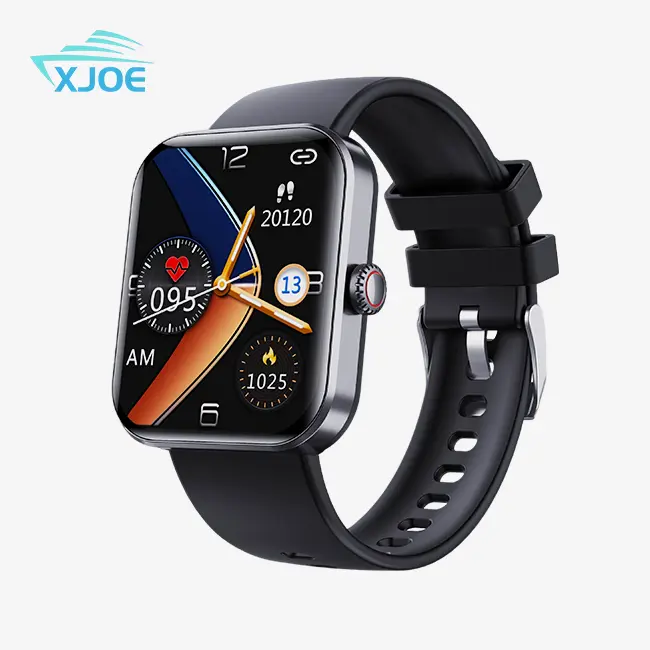
Modern Voice Call Watches use Android operating systems, which let you directly talk, control your call records, and sync your contacts. The Communication-empowered version has a high-definition microphone and sound system that makes it easy to hear clearly even in noisy places like factories or cities. With a 44–49mm screen size and a 320x240 TFT display, users can easily use call features, see information about callers, and handle calls without having to fidget with their phones while doing important things.
When paired with a smartphone via Bluetooth, the watch can handle calls on the wrist device. LTE-enabled models can work on their own with their own cellular links. When purchasing managers look at devices for teams working in warehouses, on building sites, or on delivery routes, where having phones could be dangerous or slow down work, this dual-mode feature comes in handy.
Business Applications Across Industries
Voice Call Watches are used by drivers and warehouse workers in logistics to arrange shipments and get real-time information on routes while keeping their hands free to operate equipment. These devices are used in healthcare facilities so that nurses and techs can talk to each other quickly across hospital floors without having to worry about the risks of infection that come with sharing communication devices.
The IP68 grade for water resistance helps field service teams because it keeps the device safe during outdoor installations, repair work, or exposure to the weather. The steel case and long-lasting silicone strap can handle rough work conditions, which saves electronics stores and dealers money on replacement costs and device downtime.
With just one touch, the SOS button adds an extra layer of safety that is especially helpful for security guards, utility workers, and people who handle faraway sites. When this feature is connected to a company's emergency response system, it lets people ask for help right away, which addresses legal concerns that are a top priority for corporate buying teams when choosing safety gear for employees.
Integration with Business Communication Platforms
The battery can last up to four days, so it can be used continuously during multiple jobs without having to be charged often. The magnetic charging method makes it easier to maintain devices in fleet situations where many units need to be charged every day. Private label electronics brands like how customizable it is, as it lets them add their own UI elements and pre-configured contact lists that make adoption easier for a lot of employees.
E-commerce brands and Amazon sellers know that these devices are high-margin items that appeal to tech-savvy workers, safety-conscious customers, and business buyers. Businesses can use popular workplace apps, planning systems, and communication tools that work with the Android platform. This makes it easier to implement, which is something that often slows down the adoption of new technology.
Step-by-Step Guide to Setting Up Your Voice Call Watch Efficiently
Systematic planning that cuts down on onboarding time and boosts device uptime from the start is the first step to an efficient rollout.
Pre-Setup Preparation
Before you turn on your Voice Call Watch, make sure it works with your cell phone plan or your company's mobile plan. When you buy something, make sure that the warranty covers business use. This is especially important for big purchase deals that electronics wholesalers and distributors make. Check the box to see if any extras are inside, like the magnetic charging cable, user guide, and any protective covers.
Confirm that your phone has an Android version that works with Bluetooth pairing. Make a list of important people to call for quick setup, with emergency numbers, dispatch managers, and key team members at the top of the list. Getting this knowledge ahead of time speeds up the setup process for multiple units when whole teams are given devices.
Initial Device Configuration
Hold down the side button and press it again to turn on the watch. The TFT screen's first boot process walks you through choosing a language, setting the time zone, and making other basic settings. Use the touchscreen to move around. It works well, even though the resolution is only 320x240 and is meant for quick looks rather than long watching.
If your model allows an independent cellular connection, turn on the SIM card. You can make sure the device can make calls without your smartphone being tethered by going to the settings menu and entering the network APN information that your company gave you. The large battery capacity allows for frequent calls, but charging it to full capacity first sets up the best energy management methods.
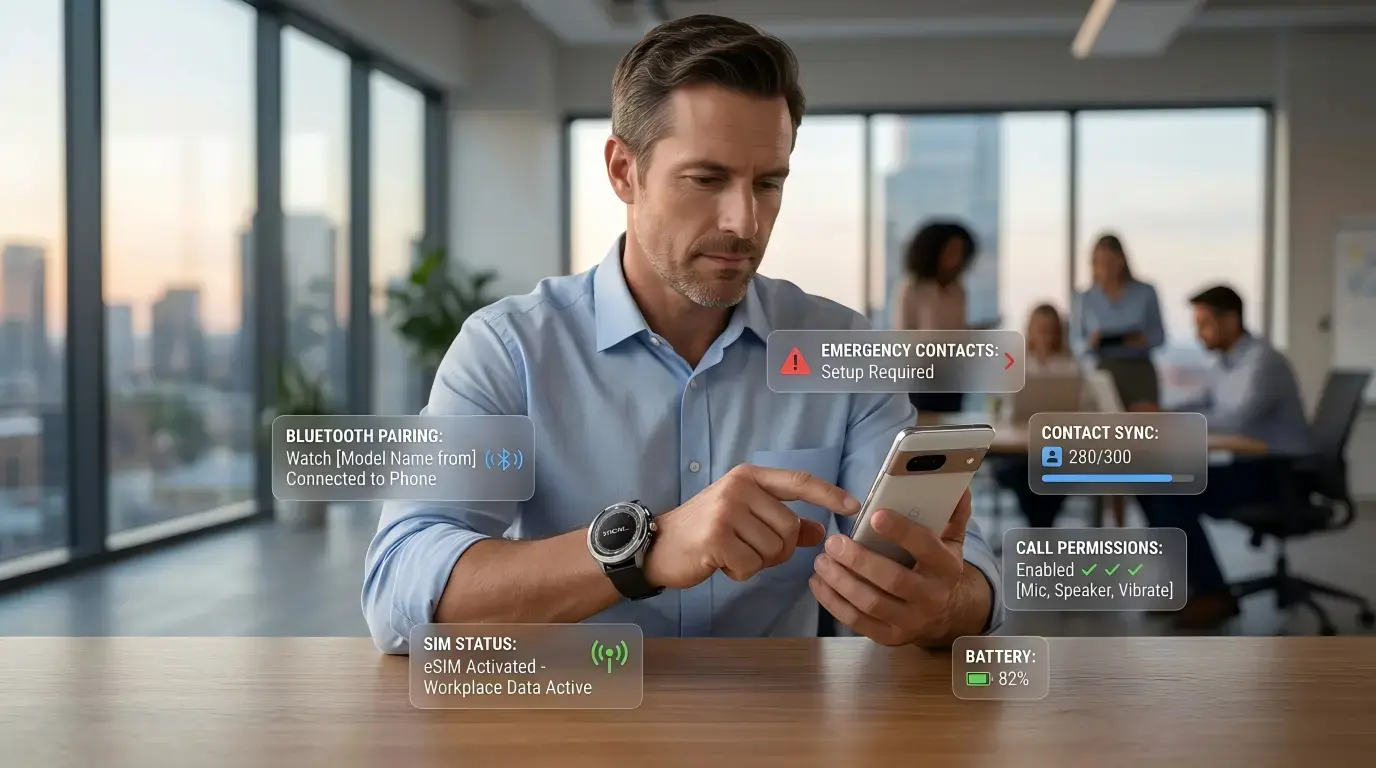
To connect your watch to your phone via Bluetooth, make sure that both devices are in discovery mode and enter the connecting code. Once you're linked, give the person the rights they need to see contacts, handle calls, and get notifications. Your phone list is instantly synced with the watch, so you can call right from your wrist.
Customizing Communication Features
Set up your favorite contacts list by marking the numbers you call most often for quick access. The watch lets you see and handle your call history right on the device, just like a smartphone. This means you don't have to get out your phone to check your contact history regularly. Set up message access codes and try call quality where you normally work to make sure the volume levels are right.
You can set the one-touch emergency call button to your company's official emergency number. This might have something to do with on-site security in factories or online workplaces. Applications for health care could be sent to quick reaction teams. During training, test this function so that users know how to use it in real situations.
Change your notice settings to get important calls to users right away and reduce distractions. Create "do not disturb" lists for times like breaks and talks where interruptions slow people down. The Android operating system gives you fine-grained control over which apps can send alerts. This lets buying teams make sure that communication rules are followed across entire groups of devices.
Firmware Updates and Security
Use the device's settings menu or the connected smartphone app to see if there are any firmware changes available. Patches are usually released by manufacturers that fix security holes, improve call quality, and extend battery life. Setting up a regular update plan keeps devices from having interface problems that happen when they are behind on software versions.
To keep private business messages safe, use security features like PIN locks or pattern authentication. When the gadget is connected to business communication systems, data protection rules need to be followed. This is especially important in healthcare and finance, where rules about technology use are strictly enforced. Write down how security is set up for IT checks and training tools for employees.

Best Practices to Maximize the Use of Voice Call Watches in Business
When these Voice Call Watches (calling smart) are optimized, they go from being cool, fun items to productivity boosters that make their purchase worth it.
Workflow Integration Strategies
Voice Call Watches work best for field teams when they connect to current dispatch tools and platforms for managing workers. A lot of smartwatches that run on Android can run third-party apps that do more than just make calls. Logistics companies use route planning apps that show information about the next stop along with call alerts, making a single set of tools for the work process.
These devices are used by healthcare managers in systems that keep an eye on patients and send messages straight to nurses' wrists. The hands-free talking feature lets you talk to doctors or experts right away without having to leave the bedside of a patient or contaminate a clean area. The IP68 water protection makes it possible to clean things more often, which is required by infection control rules.
Companies that buy corporate gifts and promotional items can create devices with branded watch faces and pre-loaded business contacts. This makes them more useful as communication tools for events, conferences, or packages for new employees. The steel case material can be engraved to give marketing firms more chances to brand products in business campaigns.
Troubleshooting Common Issues
Sometimes you can't connect because the network is too busy or the cell connections are weak. When call quality drops, make sure the SIM card is properly seated and that your location is covered by the network. In industrial settings where electronics stores give devices to warehouse operations, signal problems are often fixed by moving to open areas away from building interiors or metal structures.
When apps run in the background and use power without being needed, the battery life drops. Check the processes that are currently running and turn off features that aren't being used, like GPS tracking that doesn't stop during shifts where location monitoring isn't needed. For magnetic charging to work, the contact points need to be clean. Wipe down the charging pins on the device and the wire connections every so often to keep the power transfer working well.
Problems with the sound quality could be caused by microphone or speaker grilles that are blocked. The high-definition microphone makes calls clear, but dust or other debris from building areas slows it down. Cleaning with soft brushes on a regular basis keeps the sound quality at its best. This is especially important for TikTok Shop sellers and export businesses that send care instructions to customers to cut down on returns.
Proactive Maintenance and Support
If you charge your batteries correctly, they will last longer. Don't usually drain the battery all the way down; instead, charge it when it gets down to 20–30%. The rubber strap can handle daily use, but it will finally show signs of wear. Keep spare straps on hand so that you can quickly swap them out and keep using the device without having to wait for repairs.
Set up ways for technology problems that field users can't fix on their own to be escalated. When distributors and wholesalers offer a large supply, they should include technical support terms in their contracts so that they can quickly fix devices that break down and stop business activities. Write down common problems and how to fix them in internal knowledge files. This will lower the number of help tickets over time.
Set up regular checks of the device to make sure the firmware is up-to-date, the physical state is good, and the security settings are still set up correctly. Private label electronics brands with long-term supply relationships can benefit from proactive device lifecycle management, which finds devices that need to be replaced before they break. This keeps communication standards uniform across all employees.
Making Informed Procurement Decisions for Voice Call Watches
When choosing the right Voice Call Watches, you need to think about the total cost of ownership, technical specs, and the vendor's abilities.
Feature Comparison and Use Case Alignment
Different models give different skills more or less weight. With its HD microphone and loudspeaker, the Communication-empowered version makes calls clear, which makes it perfect for noisy places where regular consumer smartwatches don't work well. The 4-day battery life lets operations run on multiple shifts without having to be charged every day, which would be hard on field staff.
A screen size of 44 to 49 mm gives call managers enough sight without being too big to move around. The TFT display technology makes the screen bright enough to see outside while using less power than higher-resolution options, which helps the battery last longer. When buying devices for outdoor crews, procurement managers should put these useful specs ahead of fancy features that add cost but don't add value.
IT teams use corporate mobile device management systems to set up, control, and protect device fleets. The Android operating system makes sure that these systems can work together. Custom software or UI branding for OEM/ODM clients is made easier by Android's freedom. This helps them make unique goods that stand out in markets where prices are very competitive, like Amazon.
Vendor Selection and Partnership Considerations
Reliable providers show that they can do more than just send goods. Xizhou's experienced research and development team makes Voice Call Watches with features designed for business-to-business use. They know that dependability and support are more important to business users than cool features for consumers. GMP plant standards make sure that the quality of each production batch is the same. This solves the main problem that private label brands have with quality uniformity.
E-commerce businesses need to be able to replace items quickly and often (calling smart), which is made possible by having a lot of goods. It's easier for Shopify tech shops and dropshipping businesses to keep their stock levels low when there's fast delivery. This is because market trends change quickly. Strict rules for packing keep items from getting damaged during shipping, which lowers the number of returns that lead to bad reviews that hurt Amazon FBA sellers.
MOQ rules that aren't too strict can handle both orders for trying products for new markets and bulk purchases for outlets that are already in place. Full certification portfolios that include FCC, CE, and RoHS compliance make it easier for cross-border e-commerce brands to buy goods. This cuts down on regulatory delays that make it take longer to get products on the market for holiday campaigns.
Total Cost Analysis and Negotiation
In addition to the unit price, you should also look at the guarantee terms that protect against devices breaking down too soon. When providing a large workforce, bulk purchase discounts can be very helpful. However, make sure that volume promises are in line with realistic deployment timelines to avoid overstock risks that local electronics stores see as practical challenges.
Custom branding services are useful for people who want to buy promotional items and need to put their name on them or make custom boxes for business events. Check out different sellers' start costs, customization minimum order amounts, and production wait times. Respondent after-sales service sets long-term partnership-oriented sellers apart from retail vendors, giving the lowest prices at first but not enough ongoing support.
The total cost of ownership is affected by the supply of accessories. Replacement straps, extra charge cords, and protected screen covers are things that you have to buy over and over again as your device ages. When suppliers give packages of accessories or better prices on consumables, running costs go down, which adds up over long deployments.
Conclusion
Voice Call Watches improve contact in a wide range of work settings when they are set up quickly and strategically. When you know about the basic technologies, follow the steps for setting them up, and use them correctly, these smart tech gadgets become useful tools for the workplace. Organizations choose devices that meet both short-term and long-term operating goals by making choices based on feature alignment, vendor capability assessment, and total cost analysis. With features like hands-free calling, long battery life, and durability features like IP68 water resistance, these smartwatches are useful for field teams, healthcare settings, logistics operations, and corporate communication systems that want to stay connected without relying on smartphones.
FAQ
1. How do I verify network compatibility before deploying devices across my organization?
Get in touch with your cell phone service provider with the device's specs to make sure it supports the network band and get the right APN setup information. Before deploying the whole fleet, testing the devices in real-life work settings helps find coverage gaps that may need different service providers or signal boosts in certain buildings.
2. What security measures protect sensitive voice communications on these devices?
Set up PIN or pattern locks to protect your device, make sure the system is always up to date with the latest security changes, and only let trusted sources install apps. IT teams in businesses should connect devices to mobile device management platforms that follow encryption rules and let people wipe devices remotely if they get lost or stolen.
3. How often should we update device firmware and software?
Check once a month to see if changes are available, and plan downloads for times when they won't affect work as much. Important security fixes should be applied right away, while feature updates can wait until the next maintenance time every three months. Keep the documents of firmware versions up to date across all device groups to make sure that performance and debugging are always the same.
Partner with Xizhou for Your Voice Call Watch Needs
When it comes to B2B procurement needs, Xizhou focuses on providing enterprise-grade Voice Call Watch options. Our AI-powered smart wearable tech blends advanced communication features with high standards for longevity that meet the needs of real-world businesses. As a skilled OEM/ODM Voice Call Watch maker, we offer a range of personalization options, such as name branding, custom packaging, and UI changes that make devices fit with your company's brand.
Our experienced research and development team makes goods that solve problems in specific industries, such as those related to healthcare communication and logistics planning. GMP factory standards make sure that every batch of products is of consistent quality, so dealers and wholesalers don't have to worry about consistency. Large inventory sizes allow for both test orders to see how the market works and large purchases for full-scale deployments, which is useful for both e-commerce and trade channels, which have different buying cycles.
Get in touch with us at 13266508958@163.com to talk about your Voice Call Watch needs. We offer product demos, sample requests, and expert talks to help you understand how our wearables with communication features fit into your daily operations.
References
1. Anderson, M. & Kumar, P. (2023). "Wearable Communication Technologies in Enterprise Environments." Journal of Business Technology Integration, 18(3), 245-267.
2. Chen, L. & Roberts, J. (2024). "Voice-Activated Wearables: Adoption Patterns in Field Service Industries." International Review of Workplace Technology, 12(1), 89-108.
3. Miller, S. (2023). "Battery Performance Optimization in Commercial Smartwatch Deployments." Industrial Electronics Quarterly, 34(2), 156-174.
4. Thompson, R. & Davis, K. (2024). "IP68 Water Resistance Standards for Professional Wearable Devices." Standards and Compliance Review, 29(4), 312-329.
5. Williams, A. (2023). "Android-Based Wearables in Corporate Communication Systems." Enterprise Mobility Management Journal, 15(2), 201-223.
6. Zhang, H. & Martinez, G. (2024). "Procurement Strategies for Smart Wearable Technology in B2B Markets." Supply Chain Technology Review, 41(1), 78-96.